

0
0
Mar 29
Gamer Roof
Most games want something from you. They want your score to go up, your rank to improve, your timer to beat the last run. Hozy does not want any of that. It just wants you to show up, pick up a mop, and make something look good again. I spent time digging into everything this game offers, and I want to share it properly.
Here is the full breakdown: what Hozy is, who made it, how the gameplay works, how to get it on your PC, what hardware you need, and a complete button-by-button controller guide for both PC and Xbox.
Hozy at a Glance
Hozy is a cozy room restoration and decoration game. Come On Studio built it, and tinyBuild is publishing it. The Steam release date is March 30, 2026. You play as someone who left their small hometown for the big city, and after that chapter of life does not go as planned, you come back. The town feels different now. Quieter. A little worn. And somewhere in that stillness, you find a new purpose: cleaning and restoring the spaces that used to matter to people.
There are nine locations to work through. Each one belongs to someone. Each one has a story sitting quietly in its walls, its furniture, its objects. You are not just cleaning rooms. You are reading chapters of a neighbourhood that almost disappeared.
A Game Built Around One Feeling
I want to be direct about what kind of game this is, because it matters.
Hozy is not trying to be exciting. It is not trying to surprise you with enemies or plot twists or leaderboards. The entire design philosophy is built around one specific feeling: the satisfaction of making something clean and beautiful again. That is the whole product. And it delivers that feeling consistently, through small physics-based interactions that reward attention to detail.
Wipe a dirty window until it clears completely. Mop a floor section by section and watch the grime disappear. Apply paint to a wall and see the color transform the whole mood of a room. These are not deep mechanics. They are simple ones, done well, repeated at a pace that never pushes you.
I have played PowerWash Simulator for hours at a time without realizing how long it had been. Hozy is going after a very similar psychological space, but it layers in storytelling and interior design on top of the cleaning. That combination has real potential.
The Nine Locations and What They Mean
Each of the nine spaces in Hozy has its own identity. The developer designed them to feel genuinely lived in, not like generic game levels. Here is what the game has confirmed:
- Your parents’ home, where the journey begins
- An artist’s workshop, filled with the remnants of creative work
- An old café that carries years of memories in its furniture and corners
- Dreamlike spaces that stretch the tone of the game into something more reflective
- A location tied to your father’s longtime dream of a peaceful spot by the sea
Each space contains objects and personal items that belong to its residents. These details are not explained to you through cutscenes or dialogue boxes. You discover them by being present and paying attention. That is a quiet but effective form of storytelling.
Tools You Will Use and How They Work
The tool set in Hozy is physical and hands-on. You are not navigating menus to apply changes. You pick up a tool and use it directly in the space. Here is what is available:
- Mop: covers floors with broad sweeping motions, clearing dirt layer by layer
- Squeegee: wipes glass surfaces clean, satisfying in a way that is hard to explain until you try it
- Crowbar: used during the renovation phase to remove old materials before restoration begins
- Paintbrush and roller: for applying color to walls, with a curated palette available for each room
- Placement tools: for positioning, rotating, and arranging furniture freely throughout the space
The physics simulation behind these tools is one of Hozy’s strongest selling points. Dirt responds realistically. Paint covers surfaces with appropriate coverage. Objects have weight when you move them. These details make the work feel meaningful rather than symbolic.
Decorating Without Overwhelm
One thing that separates Hozy from other decoration games is the approach to choice. Many games in this genre give you access to hundreds of items and expect you to figure out what works. That sounds like freedom but often feels like homework.
Hozy takes a different approach. For each location, the game offers a carefully selected set of furniture and décor items that are already designed to complement each other. You still have complete freedom in how you arrange them. You can place anything anywhere, rotate it, stack it, or leave it out entirely. But the items available to you will always look good together, which removes the decision fatigue without removing the creativity.
The result is that you spend your time actually decorating rather than second-guessing whether two items match. That is a smart design decision and one I appreciate more the older I get.
Sound and Atmosphere
The soundtrack comes from Yann Van Der Cruyssen, the composer behind the Stray and Seasons After Fall soundtracks. Both of those games are known for music that feels emotionally warm without being sentimental or dramatic. Hozy’s audio direction follows the same sensibility.
Beyond the music, the ambient design does real work. Open a window and the sound of the outdoors comes in. Dust catches the light and drifts. The space breathes differently. Light candles and the room shifts in mood. These are small moments, but they stack into something that feels genuinely immersive for a game this quiet.
You can also interact with objects purely for the sensory experience. Switch on a projector. Arrange books on a shelf. Paint something on a wall. None of these are required for progress. They exist because they feel good to do.
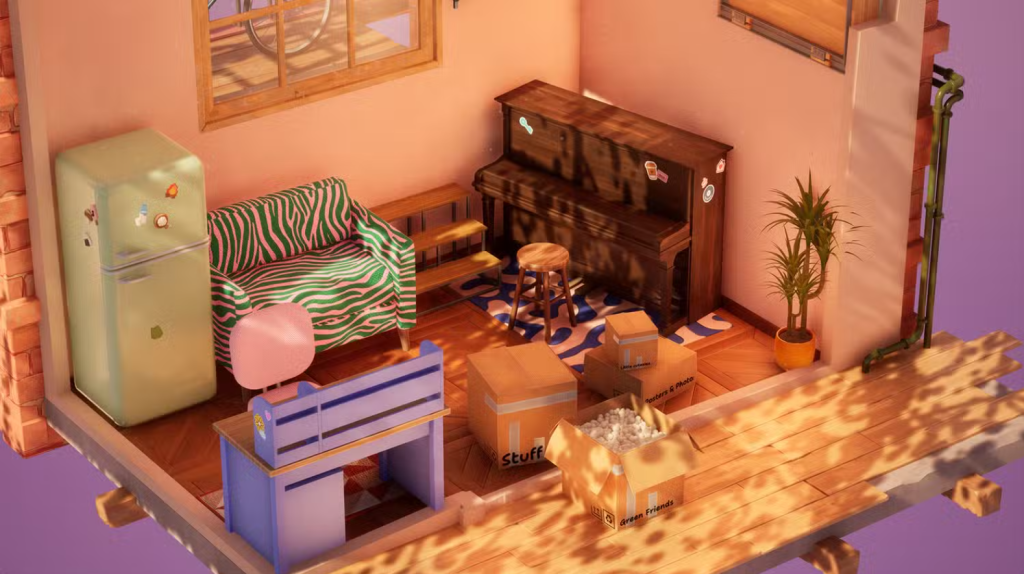
Photo Mode
Once you finish a space, photo mode lets you document your work with real camera controls. Adjust the angle, move the camera position, apply filters, and hide the UI for a clean shot. It is not a throwaway feature. The tools are detailed enough to let you compose a genuinely good image rather than just snapping a screenshot.
If you enjoy sharing your in-game work on social platforms or simply want a record of what you created, this mode gives you the tools to do it properly.
How to Download Hozy on PC Through Steam
Hozy is available on PC through Steam only at launch. Here is the step by step process to get it installed:
- Visit store.steampowered.com in your browser
- Create a free Steam account if you do not already have one
- Download and install the Steam desktop client from the official Steam page
- Log into Steam on your desktop
- Type “Hozy” into the search bar at the top of the store
- Click the Hozy listing from the results
- Click “Add to Cart” or “Buy Now” and complete the purchase
- Go to your Steam Library from the left sidebar
- Find Hozy and click “Install”
- Select a drive with at least 5 GB of free space
- Let the download complete and click “Play” when it finishes
Steam handles updates automatically after installation, so you will always have the latest version without doing anything manually.
Important note: Steam stopped supporting Windows 7 and 8.1 as of January 2024. You need Windows 10 or newer to run Steam and therefore Hozy.
PC System Requirements for Hozy
Check these before you buy. Hozy is not technically demanding, but you still want to confirm your PC meets the baseline.
Minimum Specifications
| Component | Minimum Requirement |
|---|---|
| Operating System | Windows 10 64-bit |
| Processor | Intel Core i3-2100T or AMD FX 6100 |
| Memory | 8 GB RAM |
| Graphics Card | Nvidia GeForce GTX 660 or AMD R7 260x |
| DirectX | Version 11 |
| Storage | 5 GB available space |
Recommended Specifications
| Component | Recommended Requirement |
|---|---|
| Operating System | Windows 10 64-bit |
| Processor | Intel Core i5-3570K or AMD Ryzen 3 |
| Memory | 16 GB RAM |
| Graphics Card | Nvidia GeForce GTX 980 or AMD R9 290X |
| DirectX | Version 12 |
| Storage | 5 GB available space |
Most gaming PCs built after 2016 will handle Hozy comfortably on recommended settings. The game does not push your hardware. It is designed around ambience, not raw visual performance.
Complete Controller Button Layout Guide for PC and Xbox
Hozy plays very well with a controller. The pacing suits it. There is no moment in this game where you will wish you had faster inputs. Using a gamepad on the couch while you slowly restore a room is genuinely the ideal way to experience it.
Below is the full button layout for the Xbox controller, which works identically whether you are playing on PC with an Xbox controller connected through Steam or playing directly on Xbox. For PC users, connect your controller via USB or Bluetooth, then enable Xbox Configuration Support in Steam Settings under the Controller section.
Movement and Navigation
| Button or Input | What It Does |
|---|---|
| Left Stick | Walk and move around the room in any direction |
| Right Stick | Look around and rotate the camera |
| Left Stick Click (L3) | Toggle between walk speed and a faster movement pace |
| Right Stick Click (R3) | Snap the camera back to center behind your character |
| D-Pad Up | Open your current task list or room checklist |
| D-Pad Down | Toggle ambient sounds and environmental audio on or off |
| D-Pad Left | Cycle to the previous paint color or material option |
| D-Pad Right | Cycle to the next paint color or material option |
Cleaning and Tool Actions
| Button or Input | What It Does |
|---|---|
| Right Trigger (RT) | Activate your current tool, apply paint, scrub, or clean a surface |
| Left Trigger (LT) | Zoom in on a surface or focus on a specific object or area |
| Right Bumper (RB) | Cycle forward through your available tools |
| Left Bumper (LB) | Open the furniture and décor selection panel for the current room |
| X Button | Use your active cleaning tool directly on the highlighted surface |
| A Button | Interact with an object, pick it up, or confirm a placement |
| B Button | Cancel current action, drop a held item, or close an open menu |
| Y Button | Rotate a held furniture item to a new orientation before placing it |
Menus and General Interface
| Button or Input | What It Does |
|---|---|
| Menu Button (Start) | Open the pause menu with settings and save options |
| View Button (Back) | Enter and exit photo mode |
| A Button (in menus) | Select or confirm a highlighted option |
| B Button (in menus) | Go back one level in the menu |
| Left Stick (in menus) | Navigate between menu options up and down |
Photo Mode Controls
| Button or Input | What It Does |
|---|---|
| Left Stick | Move the camera position around the room freely |
| Right Stick | Tilt and rotate the camera angle |
| Right Trigger (RT) | Take the photo and save it |
| Left Trigger (LT) | Adjust depth of field or focus point |
| Right Bumper (RB) | Cycle to the next available photo filter |
| Left Bumper (LB) | Cycle to the previous available photo filter |
| Y Button | Hide the HUD and interface for a clean unobstructed shot |
| X Button | Reset the camera to its default starting position |
| B Button | Exit photo mode and return to gameplay |
For PC players who want to fine-tune how Steam reads your controller input, the Steam controller configuration guide covers every setting in detail. You can also remap any button through Steam’s built-in controller remapping tool if the default layout does not suit you.
Why Hozy Feels Different From Other Cozy Games
The cozy game market has grown fast over the last few years. Stardew Valley, Unpacking, Spiritfarer, A Short Hike, and dozens of others have shown that players genuinely want games that do not stress them out. Hozy fits into that category, but it focuses more narrowly than most.
It is not about farming. It is not about relationships or dialogue trees. It is specifically about the physical act of cleaning and decorating spaces, with enough story context to make those actions feel meaningful. That narrow focus is actually a strength. The game does not try to be everything. It tries to be very good at one thing, and from what the developer has shown, it succeeds.
If you want a broader look at how cozy games have developed as a genre, IGN’s game coverage has tracked many titles in this space with detailed reviews worth reading before you decide where to spend your money.
Frequently Asked Questions About Hozy
When does Hozy come out?
Hozy releases on Steam on March 30, 2026.
Who developed Hozy?
Come On Studio developed Hozy. tinyBuild is the publisher handling its release and distribution.
Is Hozy available on Xbox or PlayStation?
At launch, Hozy is confirmed for PC via Steam. No console release has been announced for Xbox or PlayStation as of March 2026. However, tinyBuild regularly brings its titles to console after PC launch, so that may change.
Does Hozy have any story or is it just cleaning?
It has both. Each of the nine locations contains personal stories told through objects and environmental details. There is also an overarching narrative about returning to your hometown and helping your father fulfill a dream. The story is subtle but present throughout.
How long does Hozy take to finish?
An exact playtime has not been confirmed. Given nine unique locations with replayable decoration systems, most players should expect several hours of content. The replayability element means you can return and redesign rooms, which extends that number further.
Is Hozy good for people who are not gamers?
Yes. The controls are simple, the pace is slow, and there is no way to fail. It is one of the more accessible games released in 2026 and should be comfortable for people who do not play games regularly.
Does Hozy work with a keyboard and mouse?
Yes. Hozy supports both keyboard and mouse input as well as controller. The game is designed to work well with either, though the controller layout feels particularly natural given the slower pace of play.
Is there a demo available before buying?
No demo has been confirmed at the time of writing. Check the Steam store page around the release date, as tinyBuild sometimes releases demos alongside or shortly after launch for their titles.
Does Hozy have any difficulty settings?
No. Hozy does not have difficulty settings because it has no difficulty to begin with. There are no enemies, no timers, and no way to lose. The experience adjusts to your pace automatically.
What language options does Hozy support?
Language support details have not been fully confirmed at the time of writing. Check the Steam store page for the full list of supported languages after launch.
Can I run Hozy on a laptop?
Yes, as long as your laptop meets the minimum requirements. An Intel Core i3 processor, 8 GB RAM, and a GTX 660 equivalent GPU will get you running. Most mid-range laptops from the last five years should handle it without trouble.