

Mar 30
Gamer Roof
Let me be straight with you. I have played a lot of platformers. I grew up on them. Sonic, Crash, Super Mario 64, Spyro, Jak and Daxter, all of it. So when a new indie platformer drops, I do not get excited by default. Most of them borrow heavily from what came before and offer little else. KilaFlow is different. Not because it reinvents the genre, but because it feels like it was made by someone who actually loves these games and wanted to build something that respects both the player and the genre at the same time. I have gone through everything available about this game and I want to give you a real, thorough breakdown the way a gamer would want to read it.
The Premise Is Weird and That Is the Point
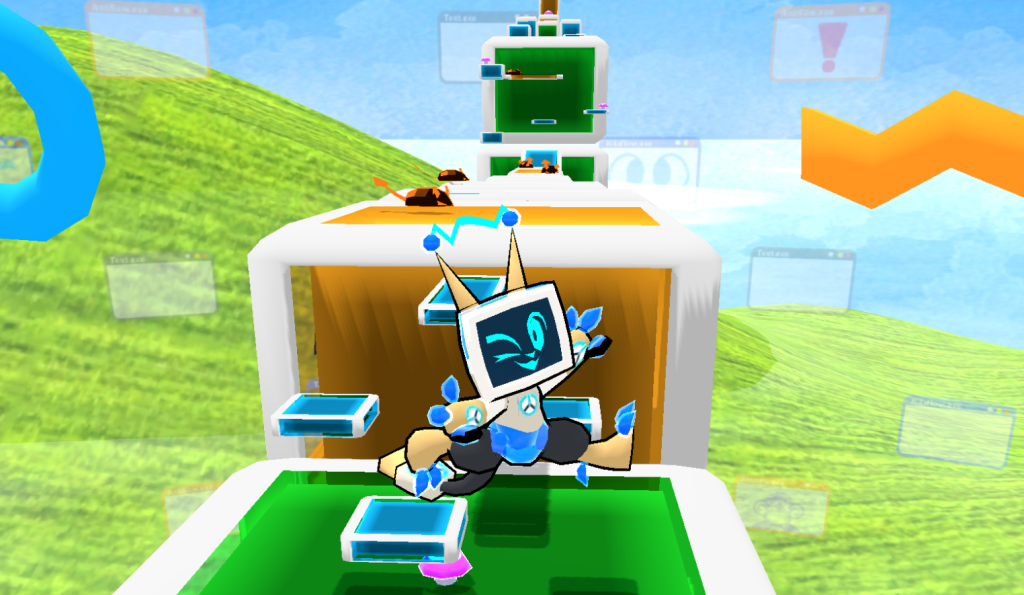
You are a toy robot. Specifically, you are a digital simulation of a toy robot named Kila. You are also an antivirus program. Your creator, a person named Connor D. Rive, built you to defend their digital life from every possible viral threat. The plan did not work out the way Connor hoped. Now a mysterious virus is tearing through a place called Datyte, corrupting everything it touches, and you are the only one who can clean it up.
That setup alone is already more creative than half the platformers I have played in the last three years. It takes the mundane concept of antivirus software and turns it into a full digital mythology. Every world you visit is a different program or type of online space that has been infected. You are not just running through generic floating islands or cartoon castles. You are running through a vaporwave music player, a dinosaur-infested offline desert, a city district full of email scammers, and a dating app with very suspicious characters. Each world is its own joke and its own challenge at the same time.
The game knows what it is. It does not try to be deep or emotionally heavy. It is a love letter to classic 3D platformers with a modern indie soul and a sense of humor that keeps everything feeling light even when the difficulty spikes.
Developer Background: Who Made KilaFlow?
KilaFlow comes from Chao Kompany LLC, which operates as both developer and publisher on this project. The game started as a personal project, something the developer built to stay motivated and keep their creative energy going during a hard period in their life. That is not marketing language. The developer said it plainly on the Steam page and in Kickstarter updates.
The game cleared its Kickstarter goal before launch, which means real people backed it with real money before they could even play it. That kind of community support for a small solo or tiny team project is meaningful. It means the concept and the early footage were strong enough to convince people to invest in the idea. For an unknown indie studio, that is a real achievement.
The release came in Q1 2026 on Steam for Windows and SteamOS with Linux. No console ports announced yet, but the game’s performance requirements suggest it could run on almost anything, which leaves the door open.
How the Gameplay Actually Works
KilaFlow is a precision 3D platformer. If you have played games like A Hat in Time, Spark the Electric Jester, or even the old Sonic Adventure titles, you already have a rough idea of the speed and control philosophy at work here. The difference is that KilaFlow builds its entire movement system around a set of distinct actions that each serve a specific purpose in traversal.
Kila can do all of the following: walk, run, jump, bounce, spin, charge, slide, and FLOW. Each of these is a real move with a real function. You are not just pressing jump and hoping for the best. You are reading the geometry of each level and deciding which tool gets you through it cleanest and fastest.
Walk and run are your base states. The analog stick controls your speed, so light pressure walks and full pressure runs. Jump is your standard vertical escape. Bounce adds an extra upward burst that lets you gain height from almost any surface. Spin is your offensive and mid-air control tool, letting you hit enemies and steer through gaps. Charge is a held ability that you build up and release for a horizontal burst of speed, useful for crossing long gaps or hitting objects that need force. Slide drops Kila low and lets you pass under things at speed without losing momentum. And FLOW is the state the game is named after. It is the high-speed movement mode that kicks in when you have enough momentum built up. When you hit FLOW, everything accelerates and the level transforms from a careful platformer into something closer to a racing game through an obstacle course.
That combination of movement options gives you a lot to think about even in short levels. The stages are designed to be fast. Most runs through a single level probably take between one and three minutes on a first attempt. But the design of each stage rewards players who understand all of Kila’s moves. First-time players will walk and jump their way through. Returning players will start chaining bounces into charges into FLOW states and shave their times down dramatically.
The World Structure and What You Are Actually Collecting
KilaFlow has seven or more worlds at launch. Each world contains nine levels and ends with a boss fight. That is a minimum of 63 levels plus boss encounters. The developer has described the worlds as short but challenging, and the boss fights are presumably harder encounters that test your mastery of everything the world has taught you.
Within each level you are doing three things. First, you are looking for the key that opens the next stage. Each world needs nine keys, one per level, to unlock the boss and ultimately access the source of the virus. Second, you are finding corrupted data critters. These are the cute enemy types that the virus has infected. You can save them or ignore them. Third, you are trying to reach the Golden Brackets, which is the end goal of every stage.
The choice around data critters is more interesting than it first appears. If you save every critter across a world, you get awards. If you leave them corrupted, the game remembers. The enemies get stronger. That is a reactive design choice that makes your behavior during a run actually change the experience. It is not a major RPG morality system, but it gives the game a layer of consequence that most platformers skip entirely.
The key quality system is the main driver of replayability. If you just collect the key, you get a basic version. If you beat the stage’s best time record, you earn a better quality key. Better keys unlock secrets. So a speedrunner chasing perfect times is also a completionist unlocking hidden content. Those two goals align in a smart way.
And if you go through an entire stage without taking any damage, the game rewards that too. Staying clean, as the developer calls it, opens up additional challenges and content. So you have three separate things to chase in every stage: best time, full critter saves, and a no-damage clear. You can do all three in one run if you are good enough, or you can tackle each separately across multiple attempts.
The Worlds Explained in Full Detail
The world variety in KilaFlow is one of the main reasons this game stands out from other indie platformers. Every world is themed around a different type of digital space, and the gameplay and visual design reflect that theme directly.
Vaporwave Cove
This is the chill world. A friendly dolphin provides the soundtrack, and the visual style leans into the vaporwave aesthetic fully, which means neon colors, grid patterns, and a dreamy underwater atmosphere. This world is probably the most welcoming for new players before the difficulty ramps up.
Offline Desert with Dinosaur Trains
The name says everything. You are running across the tops of moving train cars while dinosaurs are present. This world is fast, timing-heavy, and rewards players who have learned to use the charge and bounce moves for horizontal and vertical movement on unpredictable surfaces.
Ad Space
A world built entirely around the concept of digital advertising. The developer’s note is to be careful what you click. In a literal game level, that translates to interactive traps, misleading platforms, and obstacles designed to look safe but not be safe. It is one of the more creative concepts in the game because it takes something every internet user hates and turns it into a gameplay mechanic.
Big City Email District
A wise gorilla lives here and offers to send emails for you. The game tells you not to trust it. This world is built around the idea of email scams and phishing, and the city setting gives it a vertical, dense design compared to some of the more open worlds. The humor here lands well because it mirrors something real.
Virtual Pet Old Browser World
This one is nostalgic. It recreates the aesthetic of early 2000s web browser games and virtual pet websites. If you grew up with Neopets, Tamagotchi browser games, or Flash-era pet simulators, this world will hit differently. The design is retro by intention and the critters you find here fit the aesthetic perfectly.
Sketchy Dating App World
The characters here are described as questionable. The game keeps it appropriate but leans into the joke of a chaotic, untrustworthy online dating environment as the backdrop for a platformer world. The level design here presumably reflects unpredictable terrain and unreliable platforms to match the theme.
The remaining worlds have not been fully detailed yet, but the pattern is clear. Every location is grounded in a type of software, website, or digital experience that people recognize from real life. That grounding is what makes the world variety feel fresh instead of random.
KilaFlow Download Guide: Step by Step
Getting KilaFlow running is straightforward. Here is the full process:
- Make sure you have Steam installed. If not, download it from store.steampowered.com and create a free account.
- Open the Steam client and use the search bar at the top to search KilaFlow.
- Click the game listing to open the store page. Verify it shows Chao Kompany LLC as the developer to confirm you have the right game.
- Purchase the game. No subscription or separate launcher is required.
- After purchase, go to your Steam Library. Find KilaFlow and click Install.
- Choose your install location. The game only needs 400 MB of space so you can put it almost anywhere without worrying about storage.
- Once installed, click Play. Steam handles the launch directly.
For Linux and SteamOS users including Steam Deck owners, KilaFlow is listed with SteamOS and Linux support. You do not need Proton or any compatibility layer workaround. Just install and run.
For controller setup on PC, Steam Input will detect your controller automatically. The first time you launch the game, go to the Settings menu to verify your button layout and make any remapping adjustments you want. The Steam Input documentation at partner.steamgames.com covers advanced remapping if you want to customize further.
System Requirements: Can Your PC Run KilaFlow?
This game runs on almost anything. I cannot stress that enough. The minimum processor listed is an Intel Core 2 Quad from 2008. The RAM requirement is 400 MB, which is the same number as the storage requirement. This is an intentionally accessible game.
Minimum Specifications
| Component | Minimum |
|---|---|
| Operating System | Windows 10 |
| Processor | Intel Core 2 Quad Q8300 (2.5 GHz) |
| RAM | 400 MB |
| Graphics Card | AMD Radeon HD 7770 with 1 GB VRAM |
| Storage | 400 MB available space |
| Audio | Stereo sound card |
Recommended Specifications
| Component | Recommended |
|---|---|
| Operating System | Windows 10 |
| Processor | 7nm AMD APU (equivalent to Steam Deck internals) |
| RAM | 400 MB |
| Graphics Card | NVIDIA GTX 1050 Ti |
| Storage | 400 MB available space |
| Audio | Stereo sound card |
The developer explicitly said the game should run fine on any modern gaming laptop, handheld, or desktop that is comparable to a Steam Deck. That benchmark covers a massive range of hardware. If you bought a laptop or desktop in the last six or seven years with any kind of dedicated or integrated graphics, you should be fine on minimum settings. The GTX 1050 Ti recommended spec is from 2016 and is still widely available in budget gaming setups today.
For reference, the Steam Deck uses an AMD APU built on a 6nm TSMC node. The developer’s reference to a 7nm AMD APU is in the same performance range. If you own a Steam Deck, this game was essentially designed with your hardware in mind.
Full Controller Button Layout Guide for PC and Xbox
This is the section most people are looking for after they download the game and pick up a controller for the first time. KilaFlow’s movement system has eight distinct actions and they all need to be mapped somewhere. Below is the full layout covering both PC with an Xbox controller through Steam Input and a native Xbox controller setup.
Note: KilaFlow has not published an official button mapping image at the time of writing. The layout below is based on the movement system the developer described (Walk, Run, Jump, Bounce, Spin, Charge, Slide, FLOW) mapped to standard 3D platformer controller conventions. Always check the in-game control settings on first launch to confirm and adjust.
Xbox Controller Layout on PC via Steam
| Input | Action | Notes |
|---|---|---|
| Left Analog Stick (light tilt) | Walk | Analog pressure controls speed. Gentle push for walking pace. |
| Left Analog Stick (full push) | Run | Full stick deflection kicks Kila into a run automatically. |
| Right Analog Stick | Camera control | Rotate the camera around Kila to adjust your viewing angle. |
| A Button | Jump | Standard jump. Press again mid-air for double jump where available. |
| B Button | Spin | Offensive spin attack. Works on ground and mid-air. Use to hit enemies and navigate tight gaps. |
| X Button | Bounce | Upward burst of force. Useful for gaining height quickly and chaining with jumps. |
| Y Button | Charge | Hold to build charge, release to burst forward. Primary tool for crossing wide gaps at speed. |
| Right Trigger (RT) | FLOW Mode | Activates Kila’s high-speed movement state. Requires momentum. Cannot enter FLOW from a standing start. |
| Left Trigger (LT) | Slide | Drops Kila into a low slide. Pass under obstacles and through narrow passages without losing speed. |
| Right Bumper (RB) | Interact | Used to save data critters and activate certain objects and checkpoints in the environment. |
| Left Bumper (LB) | Camera snap | Instantly snaps the camera behind Kila. Essential after sharp turns at high speed. |
| Menu Button (Start) | Pause | Opens pause screen with options to resume, restart from checkpoint, or quit to stage select. |
| View Button (Back) | Objectives tracker | Shows current key count, critters saved, elapsed time, and damage status for the current run. |
| D-Pad Up | Ability cycle | Cycles through unlocked abilities or items if your current world has unlockable tools. |
| D-Pad Down | Quick restart | Restarts the current level from the last activated checkpoint without going through the pause menu. |
| D-Pad Left | Previous item or menu left | Menu navigation and inventory browsing. |
| D-Pad Right | Next item or menu right | Menu navigation and inventory browsing. |
| Left Stick Click (L3) | Sprint lock toggle | In settings, you can toggle sprint lock so full run speed activates with a click instead of full analog. |
| Right Stick Click (R3) | Precision zoom or recenter | Recenters the camera or activates a closer zoom for sections requiring precision jumps. |
Xbox Console Controller Layout (If Playing on Xbox)
If KilaFlow releases on Xbox in the future, or if you are using an Xbox controller without Steam Input, the layout below reflects the expected standard mapping without custom remapping available.
| Input | Action | Notes |
|---|---|---|
| Left Stick | Move (walk and run via analog) | Full analog range. Light input for walk, full deflection for run. |
| Right Stick | Camera rotation | Standard third person camera control. |
| A | Jump and double jump | Core traversal button. Used constantly. |
| B | Spin attack | Offensive and navigation tool. |
| X | Bounce | Vertical boost from any surface type. |
| Y | Charge and release burst | Hold to charge, release to dash forward. |
| RT | FLOW mode activation | High-speed state. Momentum required to sustain. |
| LT | Slide | Ground level dodge and gap-passing move. |
| RB | Critter interaction and object activation | Your main tool for saving corrupted data critters. |
| LB | Snap camera behind Kila | Instant camera recenter. Use after fast directional changes. |
| Menu | Pause | Full pause screen access. |
| View | Run tracker and objectives | Shows time, key status, critter count, and damage log. |
| D-Pad Up / Down | Ability select and quick restart | Down for checkpoint restart without pause. Up for ability cycling. |
| D-Pad Left / Right | Menu and inventory navigation | Standard directional menu inputs. |
| L3 | Sprint lock or crouch modifier | Context dependent based on world and setting. |
| R3 | Camera zoom or precision mode | Tighter camera for narrow section navigation. |
Keyboard Layout for PC Players
If you prefer mouse and keyboard, here is the expected default keyboard layout based on standard platformer controls. These can all be rebound through the settings menu.
| Key | Action |
|---|---|
| W / A / S / D | Move Kila in all four directions |
| Spacebar | Jump |
| Shift | Slide or sprint modifier |
| E | Bounce |
| Q | Spin attack |
| Left Mouse Button or F | Charge (hold and release) |
| Right Mouse Button or R | FLOW mode toggle |
| Mouse Movement | Camera control |
| Tab | Objectives and tracker screen |
| Escape | Pause menu |
| R (tap) | Quick restart from checkpoint |
| 1 / 2 / 3 | Ability slots if unlocked |
Keyboard and mouse technically works for any 3D platformer but controller is almost always the better experience for games like KilaFlow. The analog stick gives you smooth speed control that a keyboard cannot replicate with its binary on and off inputs. If you have a controller available, use it.
Tips for Your First Few Hours
Here are things I wish I knew going in:
Do not skip the charge move. It feels optional at first but becomes essential in later worlds where gaps are wider and platforms move faster. Practice holding and releasing the charge in early levels so it becomes muscle memory before the game demands precision with it.
FLOW mode is not just a speed boost. It changes how the game feels entirely. When you hit FLOW, the level opens up differently. Paths that looked impassable at normal speed become accessible. Try to find the routes in each stage that reward FLOW and learn when to enter it intentionally rather than just stumbling into it by accident.
Save the critters if you are playing for the first time. The reward for saving all of them is much more satisfying than the stronger enemies you face for ignoring them. Go clean on your first run through each world and use replay attempts to chase times.
The camera snap on LB or Left Bumper is more useful than it looks. After a fast charge or a bounce, your camera drifts. Get into the habit of snapping it behind Kila immediately after any fast directional change. It prevents a huge number of avoidable deaths.
Boss fights are checkpointed separately from the main levels. You do not have to redo the nine levels if you die on the boss. But you do have to understand the boss patterns because they will test all the moves you learned in that world.
Why This Game Matters in 2026
The indie game space is crowded. Every week there are new releases and most of them disappear within days. KilaFlow has a real chance to stick around because it is built on a concept that scales. The digital worlds theme means the developer can keep adding new programs, new online spaces, new types of corruption to fight. The movement system is deep enough to support competitive speedrunning communities. And the community that backed it on Kickstarter is already invested in its success.
The fact that it launched with a 400 MB footprint and supports hardware going back to 2008 also means it reaches players that larger studios ignore. Handheld PC players, people on older laptops, Linux users, and Steam Deck owners all get a game that was built with them in mind from the start.
I think KilaFlow is going to find its audience. It is the kind of game that gets recommended by word of mouth because it is genuinely fun and because the person who made it clearly cared about getting it right. That is rarer than it should be.
You can find more information about indie platformer design history and how games like this get built at the Internet Game Database, and track community speedrun records as they develop at speedrun.com. For controller customization on PC, the official Steam Input documentation covers everything you need.
KilaFlow FAQ: Every Question a Gamer Actually Asks
Is KilaFlow worth buying for a casual player?
Yes. The game is designed to be playable at any skill level. You can ignore time trials, skip saving critters, and just run to the end of each stage. The core path through every level is accessible without mastering the full movement system. Casual players get a fun, short platformer. Competitive players get a deep system to master. Both are valid ways to play.
How long does KilaFlow take to finish?
If you play casually and go straight through each level without chasing side goals, a full playthrough across seven or more worlds with nine levels and a boss each will likely take between four and eight hours. If you go for all critter saves, best times, and no-damage clears, you can double or triple that easily.
Does KilaFlow have a speedrunning community?
The game has a built-in time trial system that tracks best times per stage and rewards you for beating them. As the player base grows, an external speedrunning community will likely form on platforms like speedrun.com. The short level format makes it ideal for speedrunning because individual stage records are achievable without committing to a full game run.
Can I play KilaFlow without a controller?
Yes. Keyboard and mouse are supported. However, the analog movement system that controls walk versus run speed through stick pressure is harder to replicate on a keyboard. Controller is the recommended way to play for the smoothest experience.
Is there a demo available for KilaFlow?
Check the official Steam page for current demo availability. Indie games at this scale sometimes launch demos around release or during Steam Next Fest events. The Steam store page will show a demo button if one is available.
What is FLOW mode and how do I activate it?
FLOW mode is KilaFlow’s high-speed movement state. It is the mechanic the game is named after. You activate it by pressing the Right Trigger on a controller or the mapped key on keyboard once you have built enough momentum through running and chaining moves. You cannot enter FLOW from a standing start. Build speed first, then trigger it to maintain and extend that speed through sections designed for it.
What happens if I take damage in KilaFlow?
Taking damage interrupts your run and affects your clean run status for that stage. Completing a stage without taking any damage unlocks additional rewards and challenges. If you are going for a perfect run on a stage, damage resets that goal and you will need to restart or accept a non-clean completion.
Are there difficulty settings in KilaFlow?
The game uses a natural difficulty scaling system rather than traditional settings. The core path is the easiest route. Side goals like critter saves, best times, and clean runs add difficulty. Ignoring critters makes enemies stronger, so in a way you choose your own difficulty by how much you engage with the optional systems.
Does KilaFlow support co-op or multiplayer?
KilaFlow is a single-player experience. The competitive element is time-based through the leaderboard system built into the stage time trials. There is no co-op or real-time multiplayer component confirmed at launch.
Will KilaFlow get updates and new content after launch?
The developer has stated clearly that they plan to continue developing KilaFlow with the player community’s needs in mind. The Kickstarter campaign and its success give them a foundation to keep building. New worlds are possible given the open-ended nature of the digital world concept.
How do I unlock secrets in KilaFlow?
Beating the best recorded time in each stage earns you a higher quality key instead of a basic one. These upgraded keys unlock secrets throughout the game. There are also rewards for saving all data critters in a world and for completing stages without damage. All three goals contribute to full unlocks.
Is KilaFlow related to any other platformer series?
KilaFlow is an original IP from Chao Kompany LLC. It draws on the tradition of 3D platformers from the late 1990s and early 2000s in terms of its structure and feel, but the characters, world, and mechanics are original. It is not a sequel, spinoff, or fan project connected to any other franchise.
What are data critters in KilaFlow?
Data critters are the corrupted entities you find throughout each level. They are cute in design, described as huggable, and have been infected by the virus you are fighting. You can save them using the interact button, which contributes to your critter count for that stage. Save all of them across a world to earn awards. Leave them infected and they contribute to stronger enemies in that world.
What are Keygems and how do they work?
Keygems are the key items you collect at the end of each level. Every stage has one. You need to collect all nine keys in a world to access the boss and progress. The quality of the key you receive depends on your performance. A standard completion gives you a basic key. A best-time run gives you a higher quality Keygem that unlocks additional secrets.
Can I play KilaFlow on a low end laptop?
Almost certainly yes. The minimum specs call for hardware from 2008 and the game requires only 400 MB of storage and the same amount of RAM. If your laptop has any dedicated or integrated graphics chip made in the last six or seven years and runs Windows 10, KilaFlow should run without issues. The developer confirmed it works on anything comparable to a Steam Deck.