

0
0
Mar 31
Gamer Roof
I have been tracking VR games for a while now. Most of them fall into two buckets. Either they are tech demos dressed up as games, or they are solid experiences held back by shallow mechanics. EXD Extra Dimensional from Lords of Illusion looks like it wants to break out of both categories. A delivery guy named Max Ventura gets pulled through a dimensional rift into a fantasy world called Erath, and suddenly everything from Earth’s history has been scattered across a magical realm corrupted by ancient relics. That setup alone got my attention.
This article covers everything I know about EXD, from the full story setup and weapons system to PC and Xbox controller button layouts, system requirements, and what kind of player this game is actually built for. I also put together a full FAQ section at the bottom because there are a lot of questions floating around about VR compatibility and gameplay depth. Let’s get into it.
What Is EXD Extra Dimensional
EXD is a first person VR action RPG developed and published by Lords of Illusion, scheduled for release in Q1 2026. You play as Max Ventura, an ordinary guy working delivery runs for a company called Megazon. One shift at the warehouse ends differently than expected when a dimensional rift opens and pulls him into Erath, a fantasy world where relics and objects from Earth have been arriving for centuries, warping the land and its creatures in strange ways.
The game blends hack and slash combat with telekinetic powers, elemental magic, puzzle solving, and exploration across a world that is visually inspired by the work of classic fantasy painters Frank Frazetta and Boris Vallejo. If you grew up seeing those paintings on book covers or in galleries, you already have a feel for the tone EXD is going for. Bold, dramatic, and not shy about being over the top.
This is not a short wave shooter or a quick arcade VR experience. EXD is built as a full narrative RPG with progression, a storyline involving a mysterious figure called the First Chosen, and a world filled with secrets to uncover.
The Story Behind Max Ventura and the World of Erath
Max Ventura is not a chosen hero in the traditional sense. He is a regular person, and that is part of what makes the premise interesting. He did not ask for this. A rift opened, and now he is standing in a world he does not understand, armed with a Quantum Glove given to him by the Dimensional Guardians, beings who apparently have been managing the relationship between Earth and Erath for a long time.
Erath itself is a place changed by contact with Earth. Ancient relics from our world have seeped into the land and culture. Some of those relics gave creatures unnatural power. Others became weapons. The world has adapted around these objects in ways that feel both familiar and alien at the same time.
There is a deeper mystery running underneath the main quest. Someone called the First Chosen came before Max, attempted the same mission to cleanse Erath of Earth’s corrupting influence, and failed. What happened to them, and why they failed, is something you piece together as you explore. That kind of environmental storytelling layered over an action RPG structure gives me confidence this is more than surface level.
The main antagonist appears to be an Emperor figure backed by powerful wizards, undead forces, and creatures called Dragonids. Clearing Erath means going through all of them.
The Quantum Glove and How Combat Actually Works
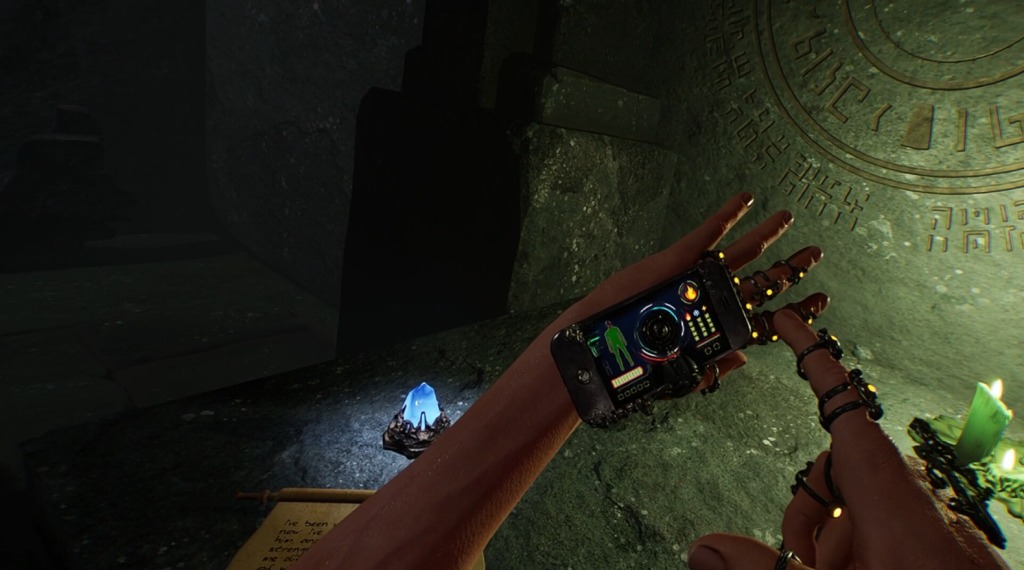
Your primary tool in EXD is the Quantum Glove, a device granted by the Dimensional Guardians that gives you access to telekinesis and elemental magic. This is not just a gimmick. The physics system in EXD is built around making your hands feel like real instruments of force.
Here is what the Quantum Glove can do based on what has been shared by Lords of Illusion:
Telekinesis
You can grab and manipulate objects at a distance. Everyday items in the environment become weapons. A loose rock, a discarded sword, a crate sitting in a corridor. In a world like Erath where Earth objects have already altered reality, picking up a piece of metal pipe and launching it at a Dragonid feels thematically right on top of being mechanically useful.
Elemental Magic
The Glove channels three core elements. Fire, Ice, and Lightning. Summon a fireball between your palms and throw it. Charge ice spikes and send them forward. Discharge a lightning bolt that spreads through grouped enemies. Each element has a different feel in how you build and release the energy, and the description of feeling the energy vibrate through your fingertips suggests the haptic feedback on supported controllers is tuned specifically for this.
Energy Management
The Glove does not have unlimited power. When your energy runs low, you fall back on physical weapons and relics. This creates a combat rhythm that stops you from just spamming magic and forces you to think tactically about when to use elemental attacks versus melee combat.
Weapons and Artifacts in Erath
The world is filled with legendary weapons waiting to be found. Lords of Illusion has specifically named three major ones, and based on their descriptions, they each serve a different combat role.
Minar Alloy Blades
These are melee weapons made from a material that appears to be an Earth alloy that has been transformed by Erath’s environment. No full breakdown of their stats has been released, but the name suggests metalwork tied to Earth origins, which fits the theme of the game. Expect close quarters combat, fast strikes, and possibly elemental infusion from the Glove.
Wands
Magic conduit weapons. In the context of EXD, wands likely amplify or redirect the Glove’s elemental power rather than replacing it. Think of them as a way to extend your range or change how your magic functions in specific situations. Wizard enemies carry them, so there is likely a moment where you face someone who knows how to use a wand better than you do when you first find one.
The Timelox
This is the standout artifact in the list. The Timelox can slow time itself. In a VR action game with fully physical enemies and fast combat, having the ability to buy yourself a few seconds to reposition, aim, or pull off a precise melee combo changes how you approach difficult encounters entirely. It is the kind of ability that rewards skill without removing challenge.
Beyond these named items, the game promises that every forgotten corner of Erath holds something. Exploration is not optional in EXD. The game is designed to reward players who go off the main path.
Enemies You Will Face
Erath is not a friendly place. The enemy roster based on available information includes several distinct types, each likely requiring a different approach.
Undead Hordes
Classic fantasy enemies that have likely been empowered by Earth relics. Numbers over individual strength suggests area control abilities like the Timelox or spread damage from fire will be valuable here.
Mutant Insects
Creatures altered by Earth contamination. Mutant enemies in fantasy RPGs often have unpredictable movement patterns and weak points that reward observation. In VR, where you are physically moving and aiming, these types of enemies tend to be among the most intense to fight.
Dragonids
Dragon type humanoids or dragon derived creatures. Given the fantasy art inspiration, these are likely visually dramatic enemies. Whether they fly, breathe fire, or have armored sections that require specific attack angles is not confirmed, but this category sounds like it includes some of the larger fights in the game.
Wizard Servants of the Emperor
These are intelligent, ranged, magic using enemies. Fighting another spellcaster in a VR game means reading their attack patterns, deflecting or dodging projectiles, and closing distance or using your own ranged magic to counter. These will probably be some of the most challenging regular enemies in the game.
World Design and Environments
EXD is not set in one type of location. Lords of Illusion has described three distinct environment categories based on available promotional content.
Crystal Caverns
Underground cave systems with crystal formations that catch light and create a visually striking space. The acoustic design here is likely a highlight given the 3D spatial audio system, where the sound of your footsteps and the ambient creak of the cavern changes as you move deeper.
Open Landscapes
Vast outdoor areas with weather and environmental sounds. The description mentions hearing wind howl through canyons. In VR with spatial audio, that kind of environmental detail is not just atmosphere. It is also directional information about your surroundings.
Underground Temples
Ancient structures that predate Max’s arrival, possibly connected to the First Chosen. These are where puzzles and secrets likely concentrate. The visual inspiration from Frazetta and Vallejo suggests these temples are not bare stone corridors but dramatic, ornate spaces filled with visual storytelling.
The dynamic orchestral soundtrack adjusts based on what is happening. Exploration gets sweeping melodies. Combat gets intensified arrangements. This kind of adaptive music is becoming more common in VR games, but getting it right requires careful design of transitions so it does not feel jarring when the tone shifts mid encounter.
Full System Requirements for PC VR
EXD is a demanding game on the visual side. The recommended specs in particular push into high end GPU territory. Here is everything you need to know before purchasing.
Minimum PC Specs
- OS: Windows 10 64-bit
- Processor: Intel Core i5-8400 or AMD Ryzen 5 2600
- RAM: 8 GB
- Graphics: NVIDIA RTX 2080 Ti or AMD RX 5700 XT with 8GB or more VRAM
- DirectX: Version 11
- Storage: 50 GB available space
- VR Headsets Supported: Valve Index, Oculus Rift S, HTC Vive Pro, Meta Quest 2 and 3 via PC Link
- Additional: Virtual Desktop supported
Recommended PC Specs
- OS: Windows 11 64-bit
- Processor: Intel Core i7-10700K or AMD Ryzen 7 5800X
- RAM: 16 GB
- Graphics: NVIDIA RTX 3080 Ti or AMD RX 6900 XT with 12GB or more VRAM
- DirectX: Version 12
- Storage: 50 GB available space
- VR Headsets Supported: Valve Index, Meta Quest 3 via PC Link
- Additional: Virtual Desktop supported
One thing worth noting. The minimum GPU requirement is an RTX 2080 Ti, which is not entry level hardware. If you are running an older card with less than 8GB VRAM, you may not meet minimum specs. Plan for upgrades or check your hardware carefully before buying.
The game also does not appear to have native standalone Quest support listed. Meta Quest 2 and 3 require PC Link, which means you need a compatible USB cable or a reliable wireless connection through Virtual Desktop or Air Link. A slow or unstable connection will affect your experience significantly in a physics heavy game like this one.
Supported VR Headsets Full List
Based on the system requirements provided by Lords of Illusion, here is the confirmed headset compatibility breakdown.
Minimum Requirements Headsets
- Valve Index
- Oculus Rift S
- HTC Vive Pro
- Meta Quest 2 via PC Link
- Meta Quest 3 via PC Link
Recommended Configuration Headsets
- Valve Index
- Meta Quest 3 via PC Link
The narrower headset list at recommended specs suggests the developers are optimizing the highest visual fidelity settings around Valve Index and Meta Quest 3. If you are running an Oculus Rift S or HTC Vive Pro, you should be able to run the game but may need to lower graphical settings to maintain smooth performance.
Full PC Controller Button Layout Guide
Playing EXD on PC with motion controllers means understanding how each button maps to an in-game action. The controls are designed around physical interaction, so the layout follows the logic of what your hands are doing rather than traditional gamepad shortcuts. The following is based on standard VR controller mapping conventions for the supported headsets. Lords of Illusion has not published a final official mapping, so this represents the expected configuration based on the game design described and standard VR RPG conventions for the listed headsets.
Valve Index Controller Layout
The Valve Index uses Knuckle controllers, which track individual finger movements. This makes them particularly well suited to EXD’s hand based interaction system.
| Input | Action |
|---|---|
| Right Trigger (squeeze) | Grip object or weapon in right hand |
| Left Trigger (squeeze) | Grip object or weapon in left hand |
| Right Grip (finger curl) | Physical grab for climbing or interaction |
| Left Grip (finger curl) | Physical grab for climbing or interaction |
| Right Thumbstick Press | Activate Quantum Glove ability on right hand |
| Left Thumbstick Press | Activate Quantum Glove ability on left hand |
| Right Thumbstick (move) | Smooth locomotion forward and backward |
| Left Thumbstick (move) | Strafe left and right |
| A Button (right) | Jump or vault |
| B Button (right) | Interact with environment objects |
| X Button (left) | Open inventory or equipment wheel |
| Y Button (left) | Use equipped item or consumable |
| System Button (left) | Pause menu |
| Both Triggers held | Charge elemental magic attack |
| Flick right wrist outward | Launch charged fireball or elemental attack |
| Pull left arm back then push | Telekinetic shove on grabbed object |
| Raise both hands together | Activate Timelox time slow if equipped |
Meta Quest 2 and Quest 3 Touch Controller Layout
Meta Touch controllers have a standard two trigger layout with face buttons. EXD’s physics system translates well to these controllers because the trigger and grip inputs give you independent control over grabbing and firing.
| Input | Action |
|---|---|
| Right Index Trigger | Fire or throw held weapon right hand |
| Left Index Trigger | Fire or throw held weapon left hand |
| Right Hand Grip | Pick up or hold object right hand |
| Left Hand Grip | Pick up or hold object left hand |
| Right Thumbstick (tilt) | Move forward, back, strafe |
| Left Thumbstick (tilt) | Rotate or snap turn |
| Right Thumbstick (click) | Sprint or boost movement |
| Left Thumbstick (click) | Crouch or dodge |
| A Button | Jump |
| B Button | Interact or examine |
| X Button | Open inventory |
| Y Button | Use equipped consumable |
| Menu Button (left) | Pause menu |
| Oculus Button (right) | System overlay |
| Index Trigger held down (right) | Charge elemental magic |
| Both Grip Buttons held together | Activate Timelox if equipped |
| Physical throw motion with grip held | Launch telekinesis projectile |
| Pull arm back and extend forward | Telekinetic push attack |
HTC Vive Pro Controller Layout
Vive Pro wand controllers are bulkier and use a trackpad instead of a thumbstick. The layout for EXD on Vive Pro follows the same physical interaction logic but mapped to the trackpad zones.
| Input | Action |
|---|---|
| Right Trigger | Grip or fire right hand |
| Left Trigger | Grip or fire left hand |
| Right Grip Button | Secondary grab or hold action |
| Left Grip Button | Secondary grab or hold action |
| Right Trackpad (top zone) | Move forward |
| Right Trackpad (bottom zone) | Move backward |
| Left Trackpad (left zone) | Snap turn left |
| Left Trackpad (right zone) | Snap turn right |
| Right Trackpad (click) | Jump |
| Left Trackpad (click) | Crouch or dodge |
| Right Menu Button | Inventory |
| Left Menu Button | Pause menu |
| Both Triggers held | Charge Quantum Glove magic |
| Physical forward thrust while charged | Release elemental attack |
Full Xbox Controller Button Layout Guide for PC Play
While EXD is designed as a VR first experience, many PC VR setups also allow gamepad control for menu navigation or accessibility use. Some players also use Xbox controllers for locomotion while using motion controllers for their hands in hybrid setups. Here is the full Xbox controller layout as it applies to EXD on PC.
Note: The Xbox controller does not replace motion controllers for hand based interactions like grabbing, throwing, or elemental magic charging. These actions require physical motion. The Xbox layout covers locomotion, menu navigation, and quick item access.
Xbox Controller Full Button Map for EXD PC
| Button | Function in EXD |
|---|---|
| Left Thumbstick | Move character forward, backward, left, right |
| Right Thumbstick | Camera rotation or snap turn depending on settings |
| Left Thumbstick Click | Sprint toggle |
| Right Thumbstick Click | Crouch |
| A Button | Jump or vault |
| B Button | Dodge or roll |
| X Button | Interact with object or NPC |
| Y Button | Use equipped consumable item |
| Left Bumper (LB) | Cycle equipped weapon left |
| Right Bumper (RB) | Cycle equipped weapon right |
| Left Trigger (LT) | Left hand grip or block stance |
| Right Trigger (RT) | Right hand attack or fire |
| D-Pad Up | Equip artifact slot 1 (Timelox) |
| D-Pad Down | Equip artifact slot 2 |
| D-Pad Left | Quick access weapon left slot |
| D-Pad Right | Quick access weapon right slot |
| Start Button | Pause menu |
| Back Button (Select) | Open full inventory and map screen |
| LT + RT held together | Activate Timelox time slow if equipped |
| LB + RB held together | Emergency dodge or panic roll |
| Hold Y Button | Open quick equip radial menu |
Xbox Accessibility and Comfort Settings
For players using an Xbox controller alongside a VR headset for reduced motion sickness, EXD supports several comfort options that can be bound or toggled through the pause menu.
- Snap Turn vs Smooth Turn: Configurable on right thumbstick. Snap is recommended for motion sensitive players.
- Vignette on Movement: Reduces peripheral blurring effect during fast locomotion.
- Seated Mode Toggle: Adjusts the play height reference for sitting play.
- Controller Rumble Intensity: Scale haptic feedback from 0 to 100 percent.
- Dead Zone Adjustment: Fine tune thumbstick sensitivity for both sticks independently.

Mature Content and Age Rating Notes
Lords of Illusion has described EXD as containing combat with blood effects and occasional strong language including profanity. This is not a family friendly title. The tone is serious fantasy adventure, not cartoonish, and the combat is designed to feel physical and impactful. Parents and guardians should be aware that VR makes this content significantly more immersive than it would be on a flat screen.
There is no confirmed age rating from PEGI or ESRB at the time of writing, but based on the content description, a Mature or 16 plus rating is likely.
Who Should Play EXD Extra Dimensional
This game is built for a specific kind of player. If you enjoy VR experiences that push physical interaction, have a strong narrative running underneath the action, and reward exploration with mechanical depth, EXD looks like it delivers on all three fronts. The physics system alone sets it apart from wave shooters and more casual VR titles.
If you are newer to VR and prone to motion sickness, the combination of full locomotion, fast combat, and large open environments might be difficult to start with. The comfort settings help, but EXD is not designed as a gentle introduction to VR gaming.
For experienced VR players looking for something with the scope of an RPG rather than a quick play session, this is worth watching closely before release.
What Makes EXD Different from Other VR RPGs
A few things stand out when comparing EXD to what is currently available in VR RPGs.
The combination of telekinesis and elemental magic through a single device, the Quantum Glove, creates a more unified combat identity than games where you have separate spell schools and physical attacks that feel disconnected. Here, everything flows through the Glove, and your melee weapons are a backup system rather than a separate gameplay layer.
The Earth artifact integration into the world lore is also interesting. Most VR fantasy games build their world without any connection to our reality. Having Earth objects scattered across Erath and being the source of both weapons and corruption gives the setting a mythology that feels grounded in something familiar even while being entirely fictional.
The visual inspiration from Frazetta and Vallejo is a specific artistic choice that separates EXD from the more muted, realistic or cell shaded aesthetics common in current VR titles. Bold color, dramatic lighting, and large fantasy figures in motion are the hallmarks of both artists. If that comes through in the environments and enemy design, EXD will look unlike anything currently available in VR.
I also want to mention the Timelox. Time manipulation mechanics in VR are underexplored. Superhot built an entire game around time only moving when you move. EXD appears to use time slow as a tool in a larger combat system, which is more interesting. Choosing when to activate it, managing the resource, and combining it with the Glove’s magic in a slowed environment could create some of the most memorable moments in the game.
Release Window and Developer Notes
EXD is scheduled for Q1 2026. Lords of Illusion has not published a specific launch date beyond that window at the time this article was written. The developer is also the publisher, which means the game releases without a third party distribution layer. That can be a positive sign for a developer retaining creative control, though it also means marketing and visibility depend more heavily on community word of mouth.
There are no user reviews on the Steam page at this time. The game has not launched yet and there is no early access period listed. Pre-release, the best sources of information remain the official Steam page and any announcements from Lords of Illusion directly.
For anyone interested in following the game’s development and any updates to the system requirements or headset compatibility list, checking the official store page regularly is the most reliable way to stay current.
Tips Before You Start Playing EXD
Based on the game’s described mechanics, here are some practical things to consider before your first session.
Clear enough physical space. EXD’s physics system requires real arm movement for magic charging and telekinesis. A standing play area of at least 2 meters by 2 meters gives you room to move without hitting walls or furniture during intense combat.
Set up your guardian boundary before you start. The game will have moments where you instinctively extend your arms to throw or charge. Knowing your boundary prevents real world collisions.
Start with snap turning. Until you know how the locomotion feels in EXD specifically, snap turn is safer for avoiding nausea. Switch to smooth turning once you are comfortable.
Explore before fighting. The game rewards thorough exploration with better weapons and artifacts. Rushing through areas to reach the next combat encounter will leave you under equipped for later sections.
Manage your Quantum Glove energy deliberately. Burning through elemental magic before a difficult fight and having to rely only on melee weapons sounds like something that will happen to most players at least once. Learn the energy indicators early and treat them seriously.
Use the Timelox strategically. Time slowing is a powerful resource. The temptation will be to use it defensively when you are overwhelmed. Try also using it offensively before combat starts to set up precise attacks before enemies react.
External Resources
For more information on VR gaming hardware compatibility and setup guides, these official sources are worth bookmarking:
- Meta Quest Air Link Setup Guide for wireless PC VR connection
- Valve Index Official Page for Knuckle controller documentation
- HTC Vive Pro Support Center for headset setup and troubleshooting
- EXD on Steam for official page and updates from Lords of Illusion
FAQ: EXD Extra Dimensional
What is EXD Extra Dimensional?
EXD Extra Dimensional is a VR action RPG developed and published by Lords of Illusion. You play as Max Ventura, a delivery worker pulled through a dimensional rift into a fantasy world called Erath. The game features telekinesis, elemental magic through a Quantum Glove, melee combat, exploration, and a narrative centered around cleansing Erath of corrupted Earth artifacts.
When does EXD release?
EXD is scheduled for release in Q1 2026. A specific date has not been confirmed by Lords of Illusion at the time of writing.
What VR headsets does EXD support?
The confirmed supported headsets are Valve Index, Oculus Rift S, HTC Vive Pro, Meta Quest 2 via PC Link, and Meta Quest 3 via PC Link. The recommended configuration focuses on Valve Index and Meta Quest 3. Virtual Desktop is also supported for wireless play.
Does EXD work on Meta Quest without a PC?
Based on the current system requirements, EXD does not have a native standalone version for Meta Quest. You need a PC connection through either a USB cable with Oculus Link or wirelessly through Air Link or Virtual Desktop. Your PC must meet the minimum hardware requirements to run the game.
What are the minimum PC requirements for EXD?
You need Windows 10 64-bit, an Intel i5-8400 or AMD Ryzen 5 2600 processor, 8 GB of RAM, and at least an NVIDIA RTX 2080 Ti or AMD RX 5700 XT with 8GB VRAM. You also need 50 GB of free storage space and DirectX 11.
What is the Quantum Glove in EXD?
The Quantum Glove is your primary tool given by the Dimensional Guardians. It allows you to use telekinesis to grab and throw objects at a distance, and channel elemental magic including fire, ice, and lightning. When the Glove’s energy is depleted, you rely on physical weapons and artifacts found in Erath.
What is the Timelox?
The Timelox is a legendary artifact in EXD that allows you to slow time. It is one of three named major weapons in the game alongside the Minar Alloy Blades and Wands. It can be used in combat to create windows for precise attacks or repositioning in difficult encounters.
Is EXD suitable for children?
No. Lords of Illusion describes EXD as containing combat with blood effects and strong language including profanity. The game is intended for adult players. VR also intensifies content compared to flat screen gaming, so parental guidance is strongly recommended.
Can I play EXD sitting down?
A seated mode is expected based on the comfort settings commonly included in VR RPGs with physical interaction. However, the game’s telekinesis and magic mechanics involve arm movement that is more natural while standing. Seated play is likely functional but not the primary design intention.
What kind of enemies are in EXD?
EXD features undead hordes, mutant insects, Dragonids, and powerful wizard servants of the Emperor. Each type likely requires different tactics and weapons. The enemies are fully physical in the game engine, meaning they interact with the same physics system as the environment and your weapons.
Is EXD an open world game?
EXD has not been confirmed as fully open world. Lords of Illusion describes it as a world with multiple distinct environments including crystal caverns, open landscapes, and ancient underground temples. Exploration is a core part of the game design, and the developers emphasize that secrets and weapons are found by going off the main path.
Does EXD have a multiplayer mode?
No multiplayer mode has been announced. Based on current information, EXD is a single player narrative RPG experience.
Who developed EXD Extra Dimensional?
EXD is developed and published by Lords of Illusion. This is a self-published title, meaning the same team handles both development and distribution.
What is the visual style of EXD?
EXD draws its visual inspiration from classic fantasy artists Frank Frazetta and Boris Vallejo. The art direction aims for dramatic, high contrast fantasy imagery with bold characters and detailed environments. The game features 3D spatial audio and a dynamic orchestral soundtrack that shifts between exploration and combat states.
Is EXD available on console VR like PlayStation VR2?
No PlayStation VR2 compatibility has been listed in the current system requirements. EXD is currently confirmed for PC VR only with the headsets listed under Valve Index, Meta Quest, Oculus Rift S, and HTC Vive Pro categories.
What is the First Chosen in EXD?
The First Chosen is a mysterious figure from Erath’s past who attempted the same mission as Max Ventura before him and failed. Uncovering the truth about what happened to the First Chosen is one of the main mysteries running through the game’s story.
How large is the EXD file size?
EXD requires 50 GB of available storage space on both minimum and recommended configurations.
Does EXD support smooth locomotion?
Yes. The control layout supports both smooth locomotion and snap turning, with comfort options available in the settings for players who prefer a less physically intense movement system.