
Mar 29
Gamer Roof
Let me be honest with you. When I first heard about Lakehopper I thought it was going to be one of those indie flight games that looks interesting in a trailer and then turns out to be a half-finished mess with a $20 price tag and a 30-day refund window that you almost use. I was wrong. Dead wrong.
One person built this game. One solo developer at Photon Games put together a 360,000 square kilometer seaplane simulator with real water physics, part-level aircraft maintenance, a persistent cargo world, and a cabin you can walk around in mid-flight. That is not a feature list from a studio with 200 people. That is someone spending years building something they actually care about. It launched on Steam on March 30, 2026 in Early Access, and honestly it already feels more complete than a lot of “finished” flight games I have played.
This is my full breakdown of Lakehopper. What it actually is, what makes it different, who should play it, PC and Xbox control layouts, system requirements, and a proper FAQ at the bottom. Let’s get into it.
What Is Lakehopper and Why Should You Care
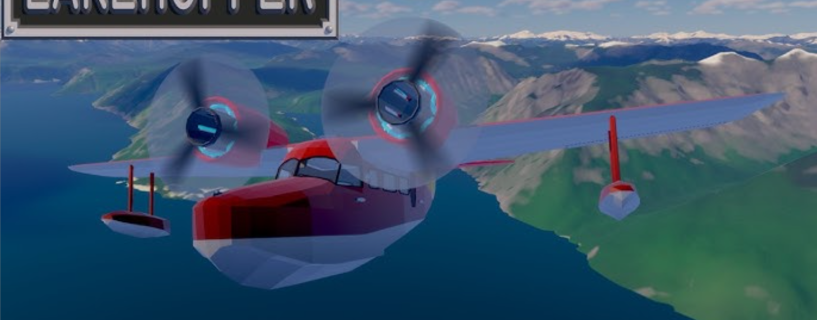
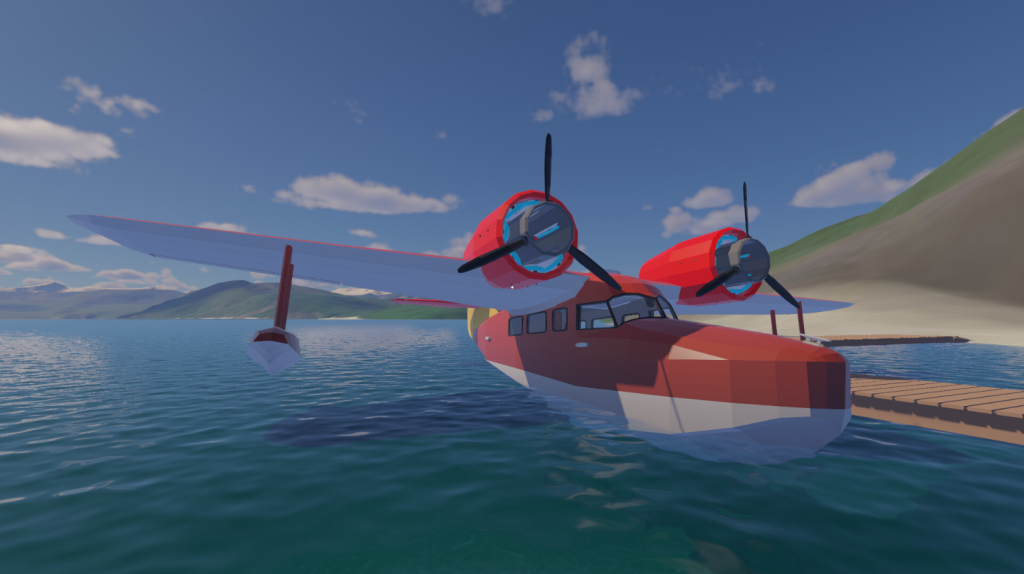
Lakehopper is a physics-based seaplane flight simulator set in a flooded, mountainous world that only seaplanes can reach. You fly a twin engine flying boat, you deliver cargo to isolated communities, and you keep your plane alive in between runs. That last part is where it gets genuinely interesting.
Most flight simulators treat the plane like a car in a racing game. You get in, you fly, you land, you repeat. The plane is just a vehicle. Lakehopper treats the plane like a living machine that needs attention. Individual parts wear down over time. A fuel pump, a control surface, a propeller component. Each one has its own condition. Ignore something long enough and it fails mid-flight, not during a cutscene, not as a game over screen. It fails while you are in the air over a mountain range with nowhere obvious to put down.
That is the kind of consequence most flight games are too scared to commit to. Lakehopper commits.
The World: 360,000 Square Kilometers of Nowhere Good to Land
The map is massive. We are talking roughly the size of Germany, based on real world terrain, filled with nothing but flooded valleys, mountain ranges, and open stretches of water. The communities you serve are genuinely isolated. There are no roads connecting them. No runways. Just water, and your seaplane.
I find this setting more interesting than most flight sim worlds I have flown in. The flooded landscape gives everything a quiet, slightly eerie atmosphere. You are not flying leisure routes between tourist airports. You are the supply line keeping remote settlements functional. That gives every run a purpose that most cargo games do not manage to create.
The terrain is based on real world geography, so it does not feel procedurally generic. Routes have character. Some legs are straightforward water hops. Others take you through mountain passes where wind and elevation actually matter. Planning a route with your navigational tools before takeoff starts to feel like a real skill you build over time.
The Plane: 100 Plus Parts and One of Them Will Always Need Something
You assemble your flying boat from over 100 individual parts. That is not a cosmetic system. Each of those parts functions, wears, and can fail. The game gives you a reference binder that works like an actual pilot document folder. Checklists, assembly instructions, navigational data, job tracking. You use it properly, not as a tutorial popup that disappears.
Startup sequences require real attention. You do not just press a button and hear the engines come alive. You work through a process. Fuel selectors, magnetos, engine priming. It sounds like a lot but it becomes muscle memory fast, and when you nail a clean cold start the first time without a checklist prompt it feels genuinely satisfying.
Here is the feature that I keep coming back to: you can walk around inside the plane while it is flying. Get out of the pilot seat, move through the cabin, check on a part that is not sounding right, and do a repair at altitude. The developer mentions keeping the door closed and watching your step, which tells you this system has real consequences attached to it. An in-flight repair mid-crossing over open water is exactly the kind of tense moment a good sim creates without scripting it.
Also Read
Hozy Game Guide 2026: Gameplay, Download Steps, PC Requirements and Xbox Controller Layout Explained
Hozy Game Guide 2026: Gameplay, Download Steps, PC Requirements and Xbox Controller Layout Explained
Early Access: What You Should Know Before Buying
Lakehopper launched into Early Access on March 30, 2026. This is a solo developer project and the developer has been open about the fact that the scope of the game grew beyond initial plans. That is worth knowing going in. Early Access means the game is playable and has its core systems working, but expect it to keep evolving with player feedback.
The Steam tags give you a good picture of what you are getting: Simulation, Flight, Exploration, Immersive Sim, Open World, Physics, Resource Management, Atmospheric, First Person, Controller support. It also runs well on Steam Deck according to the developer notes, which is a nice bonus for portable play.
If you enjoy being part of a game’s development and shaping it with your feedback, Early Access is a great time to jump in. If you need a fully polished, bugs-ironed-out experience before you commit, keep it on your wishlist and check back in six months.
System Requirements
The minimum specs are reasonable for a 2026 release. You do not need a high-end machine to get the game running.
Minimum (Windows)
- OS: Windows 10
- CPU: Intel Core i5-8500
- RAM: 6 GB
- GPU: NVIDIA GeForce GTX 1060
- Storage: 2 GB
- Sound: Built-in Stereo
The game also supports SteamOS and Linux natively, and the developer confirmed it runs well on Steam Deck. The 2 GB storage size means this is a fast download on any connection. The GTX 1060 as a floor tells you the game is optimized rather than visually brute-forced, which actually matters more for a sim you will play for dozens of hours.
Full PC Keyboard Control Layout
Lakehopper supports keyboard and mouse, gamepads, joysticks, yokes, and throttle quadrants. Every control is fully remappable in the settings menu. The defaults below follow standard flight sim keyboard conventions.
| Action | Default Key |
|---|---|
| Pitch Up | Numpad 2 / S |
| Pitch Down | Numpad 8 / W |
| Roll Left | Numpad 4 / A |
| Roll Right | Numpad 6 / D |
| Rudder Left (Yaw) | Numpad 0 / Z |
| Rudder Right (Yaw) | Numpad Enter / X |
| Throttle Up | Page Up / F3 |
| Throttle Down | Page Down / F2 |
| Full Throttle | F4 |
| Idle Throttle | F1 |
| Flaps Up | F5 |
| Flaps Down | F8 |
| Water Rudder Toggle | Shift + W |
| Water Brakes | Period ( . ) |
| Magnetos Toggle | M |
| Start Engine Left | Ctrl + E |
| Start Engine Right | Ctrl + Shift + E |
| Fuel Selector | Shift + F |
| Open Reference Binder | B |
| Open Cargo Menu | C |
| Open Parts / Maintenance Menu | P |
| Toggle Walk Mode (Cabin) | Tab |
| Walk Forward | W (in walk mode) |
| Walk Backward | S (in walk mode) |
| Interact / Inspect Part | E |
| Cockpit Camera View | Home |
| External Camera View | End |
| Look Around Cockpit | Right Mouse Button + Drag |
| Zoom In / Out | Right Mouse Button + Scroll |
| Map View | Hold M |
| Radio | R |
| Checklist Next Item | Enter |
| Pause / Menu | Escape |
| Screenshot | F12 |
Tip: If you own a joystick or flight yoke, plug it in before launching. The game auto-detects hardware axes and maps pitch, roll, and throttle to your physical controls without manual setup in most cases. Use the rebind menu to fine tune dead zones.
Full Xbox Controller Layout for Lakehopper
The gamepad layout is well thought out. Flight controls sit on the analog sticks where they belong, throttle rides the triggers, and a modifier button on LB gives you access to engine and advanced functions without pulling anything important off the main buttons. Here is the full default map.
| Action | Xbox Input |
|---|---|
| Pitch Control | Left Stick Up / Down |
| Roll Control | Left Stick Left / Right |
| Rudder / Yaw | Right Stick Left / Right |
| Look Around Cockpit | Right Stick (in view mode) |
| Throttle Increase | Right Trigger (RT) |
| Throttle Decrease | Left Trigger (LT) |
| Flaps Up | D-Pad Up |
| Flaps Down | D-Pad Down |
| Water Rudder Toggle | D-Pad Left |
| Water Brakes | D-Pad Right |
| Engine Start / Stop | Y Button |
| Interact / Inspect | A Button |
| Open Reference Binder | X Button |
| Cargo / Parts Menu | B Button |
| Toggle Walk Mode (Cabin) | Left Stick Click (L3) |
| Switch Camera View | Right Stick Click (R3) |
| Magnetos / Fuel System | LB (Left Bumper) |
| Checklist Next Item | RB (Right Bumper) |
| Full Throttle | Hold LB + A |
| Idle Throttle | Hold LB + B |
| Radio Communications | Hold LB + Y |
| Map View | Select / Back Button |
| Pause Menu | Start Button |
The LB modifier system is smart design. You keep your hands on the sticks during flight and tap combinations only when you need secondary systems. It does take a session or two to get comfortable with LB combos under pressure, but it clicks fast. All buttons are fully remappable in settings.
How to Download Lakehopper
Search Lakehopper directly on Steam. Developer and publisher is Photon Games. The game is in Early Access as of March 30, 2026. It is available for Windows and Linux. No console versions are announced. The download is only 2 GB so you are in the air fast.
Steam Deck players: the developer has confirmed it runs well on Deck. The controller layout above translates cleanly to Deck controls with some minor remapping for the back buttons if you want to free up your stick clicks.
Who Is This Game Actually For
Lakehopper is not a casual game. It asks real things of you. Startup sequences need attention. Water landings have technique. Part maintenance is not optional unless you enjoy the controlled chaos of flying a degrading aircraft over open ocean.
That said it is also not DCS-level intimidating. The learning curve is steep enough to feel rewarding but not so vertical that a motivated newcomer gets nowhere. If you have played something like Microsoft Flight Simulator, X-Plane, or even a game like Deadstick Bush Flight Simulator, you will find your footing in Lakehopper faster than you expect.
If you are a casual player looking for something to pick up and immediately enjoy, this is probably not your entry point into flight sims. But if you have ever watched a bush pilot video online and thought it looked like the most satisfying kind of flying, Lakehopper was built for you.
The walk-around cabin alone is worth the price of admission for immersion. Being able to stand up from the pilot seat, walk to a failing component, and do an actual repair at 4,000 feet with nothing but mountains visible through the window is not something most flight games let you do. This one does.
FAQ: Everything Gamers Are Asking About Lakehopper
Is Lakehopper on Xbox or PlayStation?
No. As of March 2026 Lakehopper is on PC via Steam only, with Linux and SteamOS support included. Console versions have not been announced. You can use an Xbox controller on PC though and it works well.
Is Lakehopper Early Access worth buying right now?
If you enjoy being part of a game’s growth and giving feedback that shapes development, yes. The core systems are in and functional. If you only play finished, fully polished releases then wishlist it and wait six to twelve months.
How realistic is the flight model in Lakehopper?
It uses a physics-based model designed to be both realistic and challenging. Water takeoffs and landings behave like actual seaplane physics. The startup sequences reference real procedures. It is more realistic than arcade flight games and less complex than a professional training sim. It sits in a sweet spot that most sim fans find engaging.
Can I use a joystick or HOTAS setup?
Yes. Lakehopper supports joysticks, yokes, throttle quadrants, and most common flight sim peripherals. Detailed control rebinding is built into the settings so you can map every axis and button the way you want it.
What happens when a plane part fails mid-flight?
It fails. The game does not save you with a cutscene. Depending on what failed you may lose engine power, control response, or other systems. You can attempt in-flight repairs by walking to the part inside the cabin. Whether you can fix it in time depends on the damage and where you are flying.
Does Lakehopper have multiplayer?
No multiplayer at launch. It is a single player experience built around a persistent world that carries your decisions forward across every session.
Does Lakehopper work on Steam Deck?
Yes. The developer has stated it runs well on Steam Deck. The game supports controller input natively and the 2 GB size makes it a comfortable fit for portable play.
Is Lakehopper good for flight sim beginners?
It is better suited to people with some sim experience or a genuine interest in learning. The startup procedures, maintenance system, and water landing technique all take time to learn. The reward for learning them is high but it is not a game that holds your hand through it.
How big is the Lakehopper map?
360,000 square kilometers, which is roughly 140,000 square miles. The terrain is built from real world landscape data. Most of that space is mountains and open water with no roads, which is the whole point of the seaplane setting.
What kind of cargo do you deliver?
You deliver supplies to remote communities that have no other connection to the outside world. Jobs are tracked in your in-game reference binder. The cargo system ties directly into the persistent world, so communities you serve remember your reliability over time.
How is Lakehopper different from Microsoft Flight Simulator?
MSFS is a broad global flight sim focused on visuals and worldwide coverage. Lakehopper is a focused, deep simulation of operating a single seaplane in a specific persistent world with plane maintenance, cargo logistics, and in-flight repair mechanics. They scratch different itches. Lakehopper goes deeper on the operations side. MSFS goes wider on the world and aircraft variety side.
Where can I learn more about real seaplane flying?
The Seaplane Pilots Association covers real world floatplane and flying boat training. The FAA Pilot Training section has information on seaplane ratings and endorsements if you want to go deeper on the real-world side of what Lakehopper simulates.
Lakehopper is the kind of indie game that reminds you why people build games in the first place. One developer, one very specific idea, executed with real depth. It is in Early Access which means it will keep getting better. Get in early if the concept speaks to you. If you have ever wanted a flight sim where the plane actually needs you and not just the other way around, this is it.